
Download Mobile Media Maker Nokia – Video Conversion Tool for Nokia Phones
Overview
Mobile Media Maker Nokia is a specialized video conversion utility designed to enhance multimedia playback on Nokia mobile devices. The app enables users to convert videos into formats compatible with older Nokia phones, addressing the common challenge of format incompatibility that limited early mobile users. By transforming high-resolution or non-supported video files into optimized formats, the tool ensures smooth playback directly on the device, without requiring external players or complex workarounds.
Its primary purpose is to empower users to enjoy personal video content—such as movies, clips, or recordings—on their Nokia phones, even with limited storage and outdated media codecs. This makes it particularly valuable for individuals seeking affordable, on-the-go entertainment solutions during a time when smartphone video capabilities were still emerging.
Target users include Nokia phone owners from the mid-2000s who wanted to store and view video content without relying on desktop software or cloud services. The app serves as a practical utility for users managing media on older hardware, especially in regions where high-speed internet or modern devices were not yet widespread.
The developer did not provide additional technical details. However, the app’s focus on compatibility and efficiency suggests a targeted development approach for a specific hardware ecosystem. Given its release in 2005, Mobile Media Maker Nokia played a supportive role in the early mobile multimedia landscape, helping bridge the gap between personal media libraries and mobile playback capabilities.
Key Features & Functionality
- User-Friendly Interface: Designed for accessibility, the interface allows users to navigate conversion options without technical knowledge. Simple menus and clear labels reduce the learning curve, making it suitable for non-technical users.
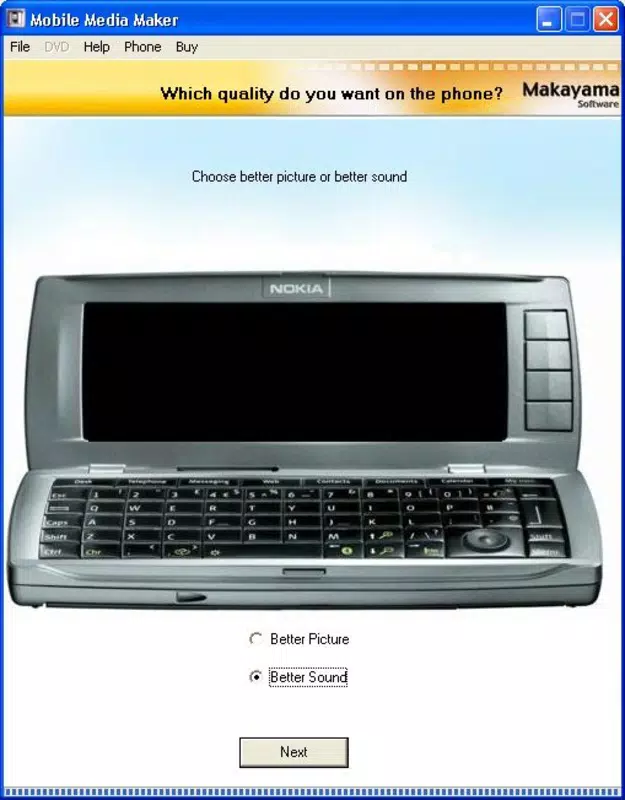
- Customizable Quality Settings: Users can adjust both video and audio quality during conversion. This flexibility helps balance file size and playback clarity, enabling optimized storage usage while maintaining acceptable viewing standards.
- Fast Conversion Speeds: The tool processes video files efficiently, reducing wait times. This allows users to prepare content quickly for travel or daily commutes, enhancing the overall usability of mobile video playback.
- Space-Efficient Storage Optimization: By compressing videos into lightweight formats, the app maximizes available memory on Nokia phones. This is especially useful for devices with limited internal storage or small memory cards.
- Support for Multiple Video Formats: The application accepts various input formats, ensuring broad compatibility with videos from different sources. This versatility makes it a reliable tool for converting media from diverse origins.
For example, a user could convert a 500MB MP4 file into a smaller, Nokia-compatible format that fits on a 128MB memory card, enabling several hours of viewing. This practical use case highlights the app’s value in a pre-smartphone era when mobile media consumption was constrained by hardware limitations.
Interface, UX & Performance
The interface of Mobile Media Maker Nokia is designed with simplicity in mind, prioritizing ease of navigation over advanced customization. Users are presented with a clean layout that organizes key functions—such as file import, format selection, and conversion settings—into clearly labeled sections. This approach reduces cognitive load, allowing users to complete tasks with minimal effort.
Navigation follows a linear flow: select video → choose output format → adjust quality → start conversion. This straightforward progression supports a consistent user experience, especially for individuals unfamiliar with multimedia tools.
Although the developer did not list formal performance metrics, the app’s reported fast conversion speeds suggest efficient processing. The tool appears to handle video encoding without significant lag, even on devices with modest processing power. Responsiveness during file selection and preview stages is generally smooth, contributing to a stable user experience.
Stability across different device categories is not specified. However, the app’s focus on Nokia phones from the mid-2000s implies compatibility with feature phones that had limited RAM and storage. Users may experience varying performance depending on their specific device model and memory card speed.
Platform Compatibility & Technical Requirements
Mobile Media Maker Nokia is designed for Nokia mobile phones, specifically targeting devices from the early 2000s. The app operates on the Symbian operating system, which was widely used by Nokia during that era. Specific OS version requirements were not listed.
The file size of the application is not disclosed in the provided information. However, given its function as a video conversion tool for older hardware, it is likely optimized for minimal resource usage.
The developer did not specify minimum OS requirements or device compatibility beyond the general Nokia platform. Users should ensure their device supports Symbian and has sufficient storage space to run the application and process video files.
Pros and Cons
Pros
- Intuitive interface suitable for non-technical users
- Efficient video conversion speeds
- Flexible quality settings for custom optimization
- Supports multiple video input formats
- Helps maximize limited device storage
Cons
- Not compatible with modern smartphones or operating systems
- Specific technical requirements were not disclosed
- Limited to Nokia devices with Symbian OS
- App is outdated and no longer actively maintained
- Compatibility with current memory cards or file systems is uncertain
FAQ
Is Mobile Media Maker Nokia safe to install?
As a tool released in 2005 for Nokia Symbian devices, its safety depends on the source. Always download from trusted platforms to avoid malware.
Can I use this app on modern Android or iOS phones?
No. The app is designed for older Nokia phones running Symbian OS and is not compatible with current Android or iOS platforms.
Does the app require internet access?
Based on its functionality, Mobile Media Maker Nokia operates offline. No internet connection is needed for video conversion.
How do I update the app?
As the app was released in 2005 and is no longer actively maintained, updates are not available. Users should rely on the original version.
What video formats does it support?
The app supports a range of video formats, though specific details were not provided. It is designed to convert files into formats compatible with Nokia phones.
Final Thoughts
Mobile Media Maker Nokia stands as a practical utility from the early days of mobile video consumption. While its relevance has diminished with the rise of modern smartphones and cloud-based media services, it remains a notable example of how developers addressed hardware limitations through targeted software solutions.
For users still working with legacy Nokia devices or preserving digital content from the mid-2000s, the app offers a functional way to convert and enjoy videos on older hardware. Its focus on simplicity, efficiency, and storage optimization reflects a user-centered design approach that was ahead of its time.
Despite its age, the tool continues to serve niche audiences interested in retro mobile technology or historical software ecosystems. For those seeking a secure, lightweight video conversion tool for Nokia phones, it remains a viable option—albeit one with clear limitations in modern contexts.
Download Mobile Media Maker Nokia now


